- sos report Download sos_2026-01-02_15-03-28.tar.gz | LimeWire
- Architecture
                     ┌──────────────────────────────────┐
                     │          Management Node          │
                     │                                  │
                     │  Hostname : csmgmt01              │
                     │  IP       : 10.50.10.100          │
                     │                                  │
                     │  CloudStack Mgmt  : 4.22.0.0      │
                     │  Cloud DB (MariaDB/MySQL)         │
                     └───────────────┬──────────────────┘
                                     │
                                     │ Orchestration / API / DB
                                     │
     ===================================================================
     ||                      KVM + LINSTOR CLUSTER                    ||
     ||                 (All KVM nodes on 10.50.11.0/24)              ||
     ===================================================================

┌──────────────────────────────────┐   ┌──────────────────────────────────┐   ┌──────────────────────────────────┐
│            KVM NODE 1             │   │            KVM NODE 2             │   │            KVM NODE 3             │
│ Hostname : cskvm01.poc.local     │   │ Hostname : cskvm02.poc.local     │   │ Hostname : cskvm03.poc.local     │
│ IP       : 10.50.11.101          │   │ IP       : 10.50.11.102          │   │ IP       : 10.50.11.103          │
│                                  │   │                                  │   │                                  │
│ CloudStack KVM Agent  : 4.22.0.0 │   │ CloudStack KVM Agent  : 4.22.0.0 │   │ CloudStack KVM Agent  : 4.22.0.0 │
│ LINSTOR role          : COMBINED │   │ LINSTOR role          : SATELLITE │   │ LINSTOR role          : SATELLITE │
│ LINSTOR Ctrl/GUI      : Yes      │   │ LINSTOR Ctrl/GUI      : No       │   │ LINSTOR Ctrl/GUI      : No       │
│ DRBD kernel           : 9.3.0    │   │ DRBD kernel           : 9.3.0    │   │ DRBD kernel           : 9.3.0    │
│ Storage pool (LVMTHIN): lvm-thin-fast on each node (~223GiB free)       │
└──────────────────────────────────┘   └──────────────────────────────────┘   └──────────────────────────────────┘

      ║═══════════════════════════════════════════════════════════════║
      ║            LINSTOR + DRBD replication (block storage)         ║
      ║   CloudStack volume -> LINSTOR resource -> /dev/drbdXXXX      ║
      ║═══════════════════════════════════════════════════════════════║


======================================================================
STORAGE (CloudStack Datastores)
======================================================================

(A) Primary Storage #1 (NFS Primary)  [Shared NFS datastore for KVM]
┌──────────────────────────────────────────────────┐
│ NFS Primary Storage                               │
│ Server IP : 10.50.10.100 (csmgmt01)               │
│ Export    : /export/primary   (example)           │
│ Protocol  : NFSv4.2                               │
│ Used for  : Primary volumes on NFS (non-Linstor)  │
└──────────────────────────────────────────────────┘


(B) Primary Storage #2 (LINSTOR Primary) [Your “second primary”]
┌──────────────────────────────────────────────────────────────┐
│ LINSTOR Primary Storage (Pool name in CS: linstor-primary)    │
│ CloudStack pool_type : Linstor                                │
│ LINSTOR controller   : http://10.50.11.101:3370               │
│ Backend pools        : LVM_THIN (lvm-thin-fast) on nodes       │
│ Used for             : Primary volumes on DRBD (/dev/drbdX)    │
└──────────────────────────────────────────────────────────────┘


(C) Secondary Storage (NFS Secondary) [templates/isos/systemvms]
┌──────────────────────────────────────────────────┐
│ NFS Secondary Storage                             │
│ Server IP : 10.50.10.100 (csmgmt01)               │
│ Export    : /export/secondary                     │
│ Protocol  : NFSv4.2                               │
│ Used for  : Templates / ISOs / SystemVM templates │
└──────────────────────────────────────────────────┘
Deployment Topology
Management Node:
- Hostname: csmgmt01
- Role: CloudStack Management Server
- OS: Ubuntu 22.04.5 LTS
- CloudStack Version: 4.22.0.0
- Does NOT run LINSTOR or DRBD
- Manages:
- CloudStack API / UI
- Database (cloud DB)
- Storage orchestration only
KVM + LINSTOR Cluster:
- Total Nodes: 3
- Hosts:
- cskvm01.poc.local
- cskvm02.poc.local
- cskvm03.poc.local
LINSTOR Deployment Model:
- cskvm01:
- LINSTOR Controller
- LINSTOR Satellite
- DRBD
- LVM_THIN storage pool
- cskvm02:
- LINSTOR Satellite
- DRBD
- LVM_THIN storage pool
- cskvm03:
- LINSTOR Satellite
- DRBD
- LVM_THIN storage pool
All three KVM nodes:
- Registered as CloudStack KVM hosts
- Participate in LINSTOR storage
- Have identical LVM_THIN pools for DRBD-backed volumes
Storage Pools:
- LINSTOR LVM_THIN pool present and healthy on all three KVM nodes
- LINSTOR diskless pools auto-created where required
- CloudStack primary storage points to LINSTOR controller on cskvm01
Secondary Storage:
- NFSv4.2
- Exported from management-side storage
- Mounted dynamically by CloudStack agent on KVM hosts
- Used for templates and ISOs
======================================================================
Environment Summary
MANAGEMENT NODE (csmgmt01)
Role: CloudStack Management Server
OS: Ubuntu 22.04.5 LTS
CloudStack Version: 4.22.0.0
DB Schema Version: 4.22.0.0
Installed Packages:
- cloudstack-management 4.22.0.0
- cloudstack-usage 4.22.0.0
- cloudstack-common 4.22.0.0
Primary Storage (CloudStack DB):
- Name: linstor-primary
- Pool Type: Linstor
- Status: Up
- UUID: 381f423d-5c3d-4037-85bb-f704bbebaa5f
KVM HOST (example: cskvm01)
Role: CloudStack KVM Hypervisor + LINSTOR Controller
OS: Ubuntu 22.04.5 LTS
Kernel: 5.15.0-164-generic
CloudStack Agent:
- cloudstack-agent 4.22.0.0
LINSTOR:
- Controller/Satellite version: 1.33.1
- Client: 1.27.1
- Storage driver: LVM_THIN
- Controller runs only on cskvm01
- Satellites run on cskvm01, cskvm02, cskvm03
DRBD:
- Kernel module: 9.3.0
- drbd-utils: 9.33.0
- drbd-reactor: 1.10.0
- Transport: TCP
QEMU / libvirt:
- qemu-img: 6.2.0
- QEMU hypervisor: 6.2.0
- libvirtd: 8.0.0
Virtualization checks:
- Hardware virtualization (vmx/svm): Enabled
- /dev/kvm accessible
- virt-host-validate: PASS (only IOMMU warning)
======================================================================
Templates
Templates registered in CloudStack DB:
-
Ubuntu 22.04
- DB format: RAW
- DB size: ~0.64 GB
-
Ubuntu 24.04
- DB format: RAW
- DB size: ~0.58 GB
On KVM hosts, template files stored on secondary NFS and named *.raw
are detected as QCOW2 via:
qemu-img info
Example:
- file format: qcow2
- virtual size: ~2.2 GiB
- disk size: ~600–700 MiB
Service Offering
Service offering used: testlinstor
ROOT disk sizes tested:
- 10 GB
- 20 GB
ROOT volume sizes verified in CloudStack DB match the offering.
======================================================================
Observed Problem
LINSTOR primary storage is detected as UP in CloudStack and volumes can
be created successfully across the 3-node LINSTOR cluster. However,
VM deployment fails specifically during ROOT volume population
from template.
Key behavior:
- LINSTOR volume creation succeeds
- DRBD-backed block device is created on KVM host
- Failure occurs only during instance ROOT disk population
- qemu-img convert to the DRBD block device fails
- CloudStack cleans up the DRBD resource and libvirt storage pool
- VM ends in Error state
- ROOT volume is marked Destroy in CloudStack DB
======================================================================
Relevant KVM Agent Log Excerpts
INFO Linstor: Creating volume for ROOT disk
INFO Linstor: Created DRBD device: /dev/drbd1001
INFO Executing qemu-img convert to DRBD device
ERROR qemu-img convert failed: output file is smaller than input file
WARN Template copy failed, cleaning up DRBD resource
INFO Linstor: Removed DRBD device and volume as part of cleanup
CloudStack Management Log Excerpts
ERROR Unable to find ObjectInDataStore mapping for TemplateObject on Linstor storage pool
WARN Failed to create ROOT volume for VM, marking volume as Destroy
======================================================================
Database Evidence
Failed instances:
-
i-2-12-VM
- ROOT volume size: 20 GB
- state: Destroy
- service offering: testlinstor
-
i-2-13-VM
- ROOT volume size: 10 GB
- state: Destroy
- service offering: testlinstor
LINSTOR storage pool remains in state = Up throughout.
======================================================================
Key Observation
LINSTOR and DRBD are functioning correctly across all three KVM nodes:
- Storage pools are healthy
- DRBD devices are created successfully
The failure occurs only at the template-to-root-volume population stage
(qemu-img convert writing to /dev/drbdX).
This suggests an issue in CloudStack’s LINSTOR integration or template
handling during ROOT volume deployment, rather than a LINSTOR or DRBD
volume provisioning problem.
Expected Behavior
CloudStack should successfully populate the ROOT volume on LINSTOR
primary storage from the template and continue VM deployment without
cleaning up the DRBD resource.
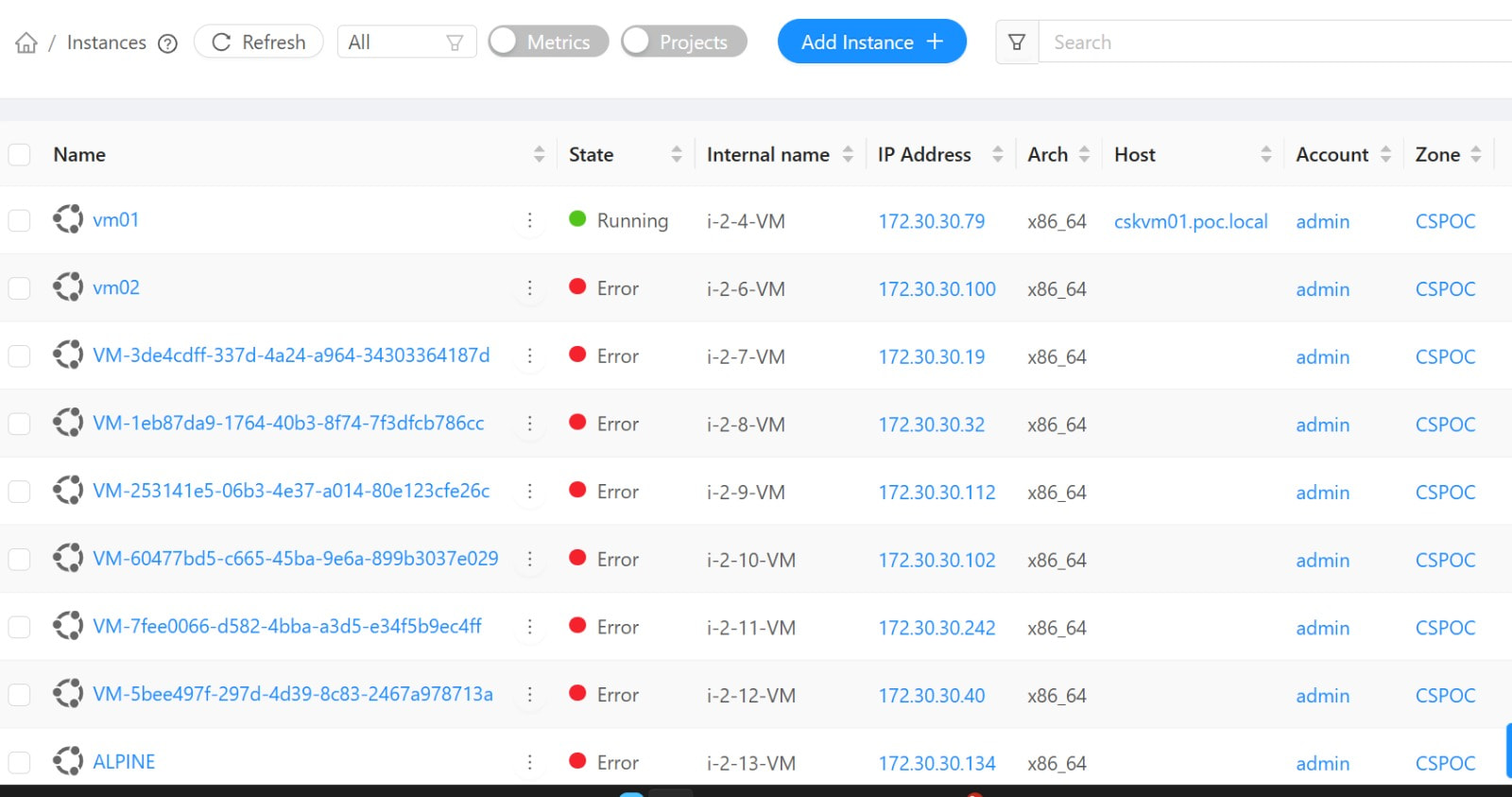

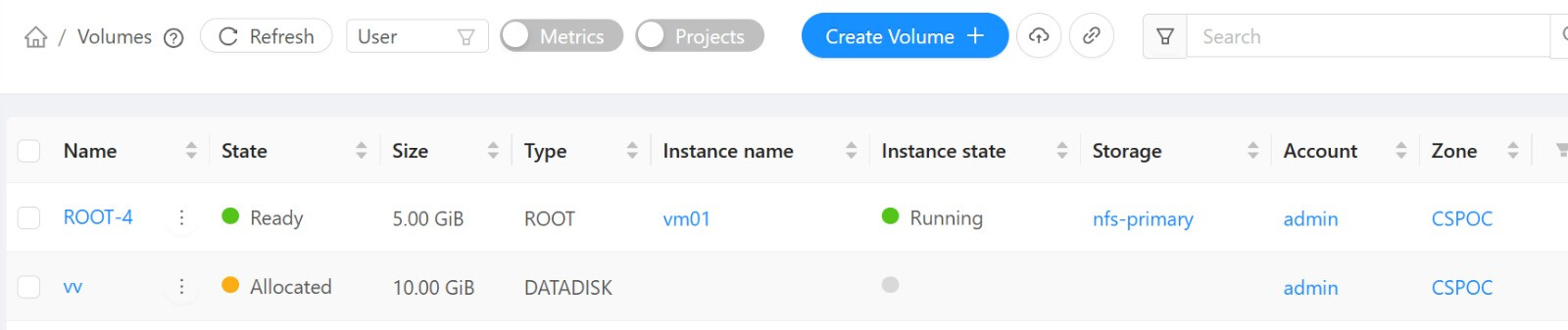
the first one is from nfs all other are created using linstor tag in compute offering.
linstor based volume can be deployed standalone but it can’t be used for vm creation fails.